
Quick Install & Dashboard
A production-ready OpenCode configuration for real-world software engineering: a team of specialist agents behind three orchestrator modes, layered MCP code intelligence and database gateway, one-shot model profiles, workflow slash commands, and optional per-project guardrails — installed into ~/.config/opencode with a single command.
⚡ 10-Second Quick Install
Install directly to ~/.config/opencode with a single command (no Git clone required):
macOS / Linux / WSL
curl -fsSL https://raw.githubusercontent.com/kenlin8827/opencode-prime/main/install.sh | bashWindows (PowerShell)
irm https://raw.githubusercontent.com/kenlin8827/opencode-prime/main/install.ps1 | iex💡 Zero-Risk Upgrades: Re-running the command above smoothly upgrades to the latest release while preserving all your API keys, custom models, and tier assignments.
⚠️ Coming from OCP 0.x? That jump crosses majors (OpenCode v1 → v2 runtime) and is locked by design — see the v1→v2 upgrade guide for the deliberate path and what breaks.
Install a specific version
# macOS / Linux / WSL
curl -fsSL https://raw.githubusercontent.com/kenlin8827/opencode-prime/main/install.sh | bash -s -- -v 0.9.0# Windows
& ([scriptblock]::Create((irm https://raw.githubusercontent.com/kenlin8827/opencode-prime/main/install.ps1))) -Version "0.9.0"Single-Screen TUI Control Center
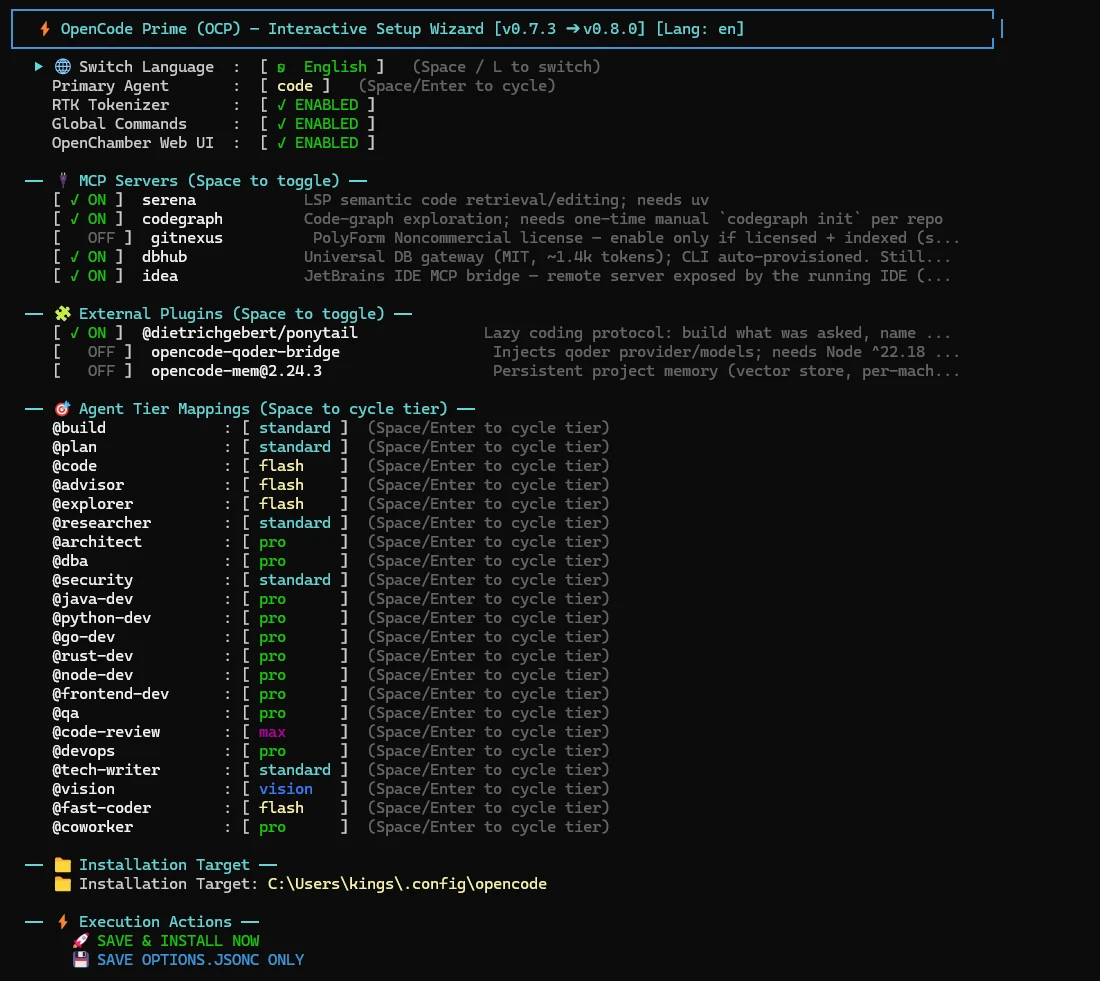
Running the install command (or ocp wizard / ocp dashboard anytime later) opens the Single-Screen TUI Control Center:
Key Capabilities & Keyboard Shortcuts
- Instant Customization: Press Space to toggle MCP servers, plugins, RTK optimizer, or cycle Agent-to-Tier model assignments (
flash/standard/pro/max/vision); - Keyboard Navigation:
↑/↓orj/k: Navigate through rowsSpace: Toggle MCP/plugin or cycle agent model tierEnter: Execute the selected action (e.g. "Save & Execute Install")Lkey: Instant language switch (English / 中文)Qkey: Exit dashboard
Global Commands Anytime (ocp / opencode-prime)
After installation, the global shortcuts are automatically registered. You can run any of them from any terminal directory:
ocp              # launch the OpenCode terminal UI directly
ocp dashboard    # open the TUI control center (aliases: ocp cc / ocp matrix)
ocp provider     # configure model providers (same wizard as /provider)
ocp profile      # select or apply a model-tier profile (same wizard as /profile)
ocp project      # initialize or configure the OCP project in the current directory
ocp usage        # inspect token and cost usage across projects
ocp tui          # launch the OpenCode terminal UI through the selected workspace wrapper
ocp web          # OpenChamber web UI (auto-generated password)
ocp desktop      # launch the native OpenChamber desktop app (alias: ocp ui)
ocp code         # open VS Code with the OpenChamber extension ensured (auto-installs when missing)
ocp update       # check suite + opencode + openchamber, interactively apply the selected updates
ocp upgrade      # pull the latest release and reinstall (one-click upgrade)
opencode-prime   # official full suite command (same dispatcher)
No more memorizing install paths — launch the TUI, reconfigure, or perform one-click seamless upgrades anytime! For the complete command list, see the OCP CLI Reference.
Client Surfaces
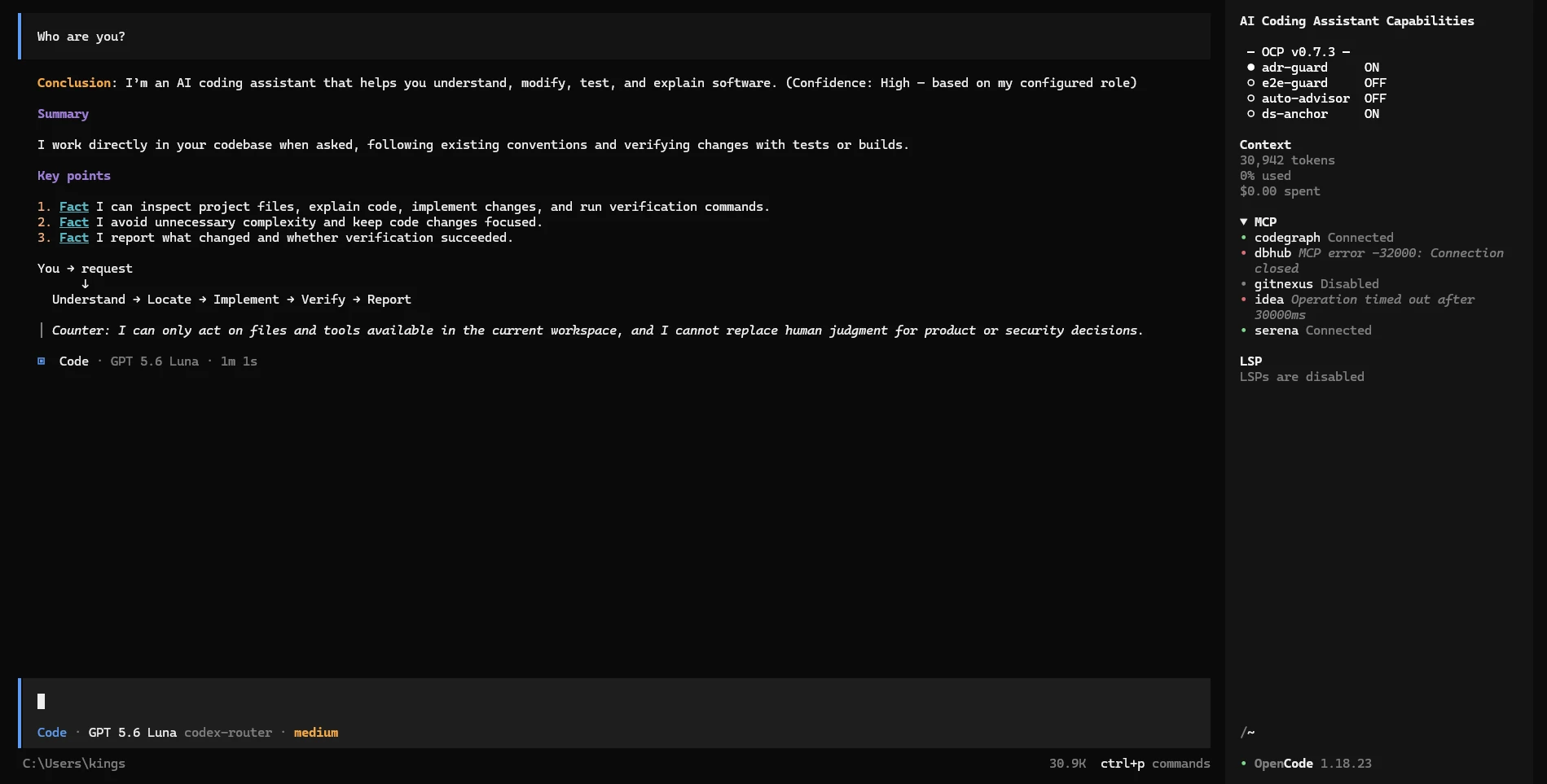
OCP supports five client modes — all sharing the same ~/.config/opencode config, zero re-setup. The terminal TUI currently offers three selectable modes: Direct, Herdr, and Luvus.
Terminal TUI — Direct
Launch with bare ocp (or ocp tui --direct) to run OpenCode directly in the current shell — the daily driver with 21 specialist agents, four working modes, and workflow slash commands:
Terminal TUI — Workspace Wrapper
Launch with ocp tui to open the same terminal UI through the workspace wrapper selected in the setup wizard: Herdr or Luvus. Together with Direct, the terminal TUI currently supports three selectable modes. Use ocp tui --direct for a one-off direct launch; --herdr and --luvus select a wrapper for one invocation.
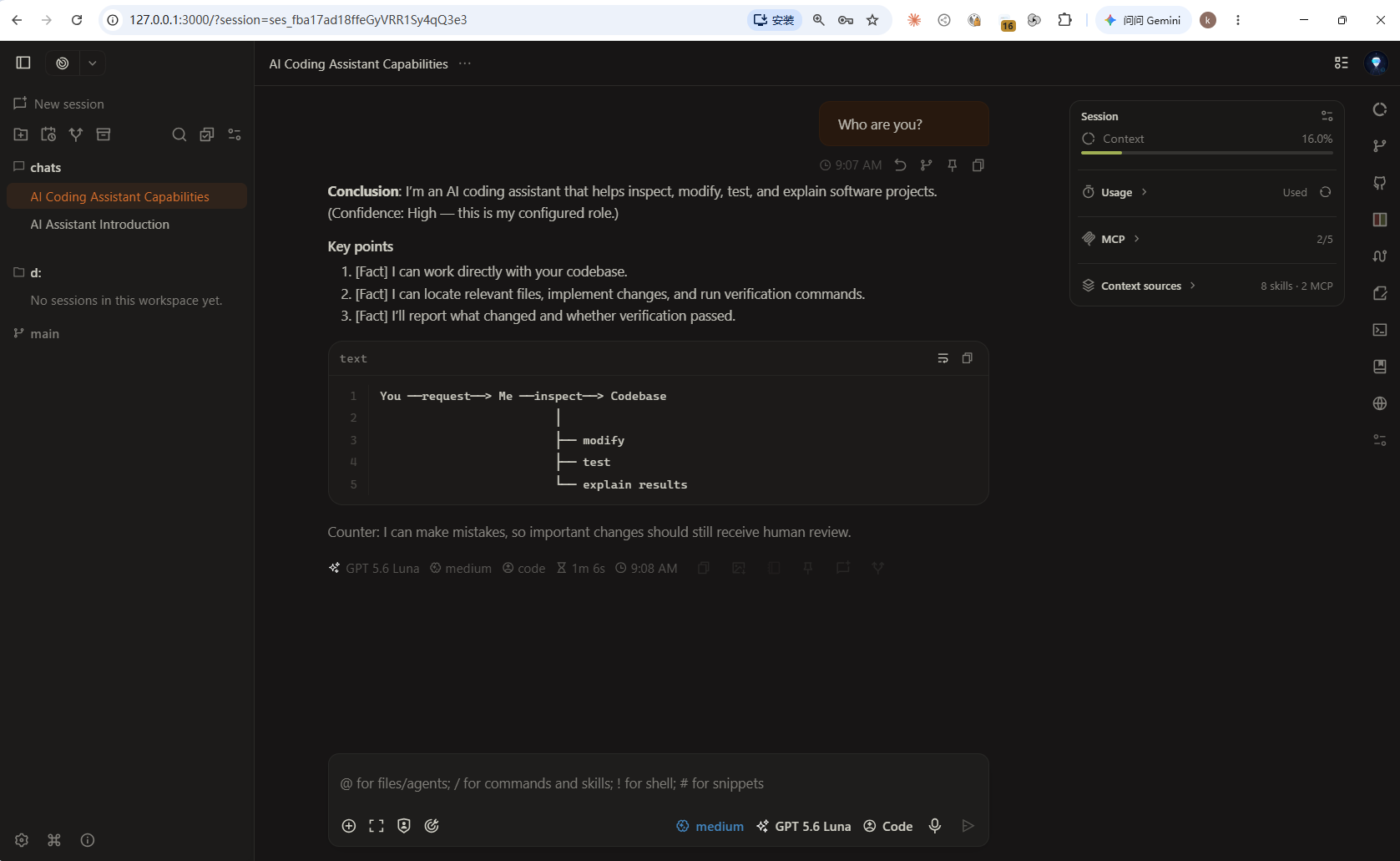
OpenChamber Web UI
Launch with ocp web — browser-based side-by-side diff and multi-model comparison, auto-generated password:
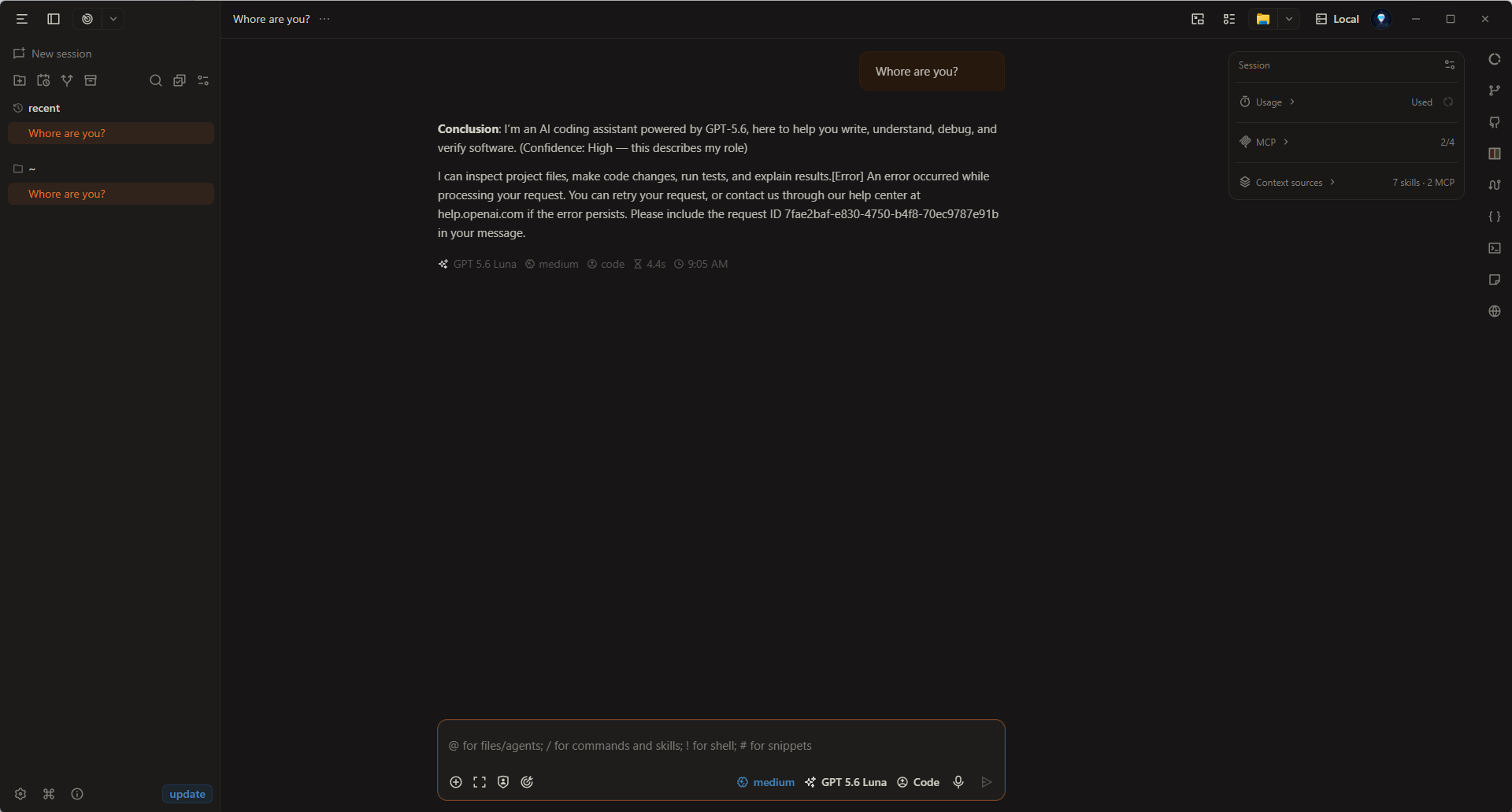
OpenChamber Desktop
Launch with ocp desktop (alias ocp ui) — native Tauri app with full keyboard navigation:
OpenChamber VS Code Extension
Launch with ocp code to open the current project in VS Code (also VSCodium, Cursor, and Windsurf) with the OpenChamber extension ensured. See Clients & UI Options for --init and editor-argument behavior.
📖 See Clients & UI Options for the full comparison.
Core Feature Matrix
| Feature | What it means for you |
|---|---|
| Specialist Agent Team | 21 specialists (@java-dev, @security, @dba, @frontend-dev, @fast-coder, etc.) tuned with domain-specific prompts, routed automatically |
| Four Working Modes | @lite (default — lean daily driver, ~2k tok/step), @code (direct development), @build (orchestrated execution), @plan (read-only analysis) |
| Code Intelligence & DB (MCP) | Pre-configured MCP servers (Serena LSP, CodeGraph knowledge graph, GitNexus, DBHub gateway) with automatic CLI provisioning |
| Profiles | /profile maps all 5 model tiers to a provider's models in one shot — no per-agent set model |
| Workflow Slash Commands | /dev compositor · /dev-quick · /dev-plan · /dev-review · /dev-ultra dev flows, /review-fix-loop, /improve-loop, /goal, /handoff, /grill-me, /advisor modes, and more |
| Optional Guardrails | Per-project ADR enforcement (/adr guard), secret-file gate (env-guard), E2E red-line adoption into project docs (/e2e-adopt), commit discipline (/project) — all opt-in |
| One-Command Installer | PowerShell + Bash, manifest-based upgrades; your credentials and model picks survive every reinstall |
| Token Savings | rtk output compression (60–90%) auto-provisioned on install + @lite measured ~2k tok/step system prompt where full-config agents carry 13k+ tok/step of overhead |
| Second-Opinion Advisor | @advisor for blocking decisions, with an adversarial red-team stance for design review |
⚖️ Positioning: omp vs OpenCode Prime
Two kinds of batteries, two kinds of rides. omp builds and ships its own native runtime; OCP loads engineering-discipline batteries into the OpenCode you already run.
| Dimension | omp (omp.sh) | OpenCode Prime (OCP) |
|---|---|---|
| Relationship to Runtime | Standalone harness — replaces your agent runtime | ⚡ Zero-migration discipline layer — keep your OpenCode runtime, plugins & config |
| What's in the Box | 🔧 Native tooling firepower: ~80k-line Rust core, hashline edits, built-in LSP/DAP, memory, browser, collab | 🧰 Discipline firepower: 21 specialist agents, MCP code intelligence, /profile presets, guardrails, workflow commands |
| Delivery Pacing | Magic keywords (ultrathink / orchestrate), single-track autonomy | 🏆 /dev-quick · /dev-plan · /dev-review · /dev-ultra — explicit human-selected tiers, SOP-friendly |
| Scheduling & Orchestration | 🟢 task fan-out into isolated worktrees, typed results, live subagent hub | 🏆 @build orchestrator + predefined role pipelines (plan visible before execution) + tiered scheduling (Flash codes, Flagship reviews) + dynamic domain-persona injection + auto-retry with task resume |
| Review Gates | /review post-hoc P0–P3 verdict, single reviewer | 🏆 /dev-review dual flagship review + @advisor safety arbitration — fixes converge inside the loop |
| Spec-Driven Lifecycle | None built-in (requires external tools) | 🏆 /prd → /plan (auto-links PRD & ADRs) → /impl → /sdd handoff — full SDD lifecycle |
| Workflow Command Suite | ultrathink / orchestrate / workflowz keywords | 🏆 /grill-me Socratic plan interrogation + /review-fix-loop auto-fix until zero P0/P1 + /improve-loop score-driven improvement loop + /goal mechanically-checkable stop conditions + /handoff git-safe session bundles |
| Token & Cost Governance | hashline edit savings + efficient in-process tools | 🏆 Five-tier agent-to-model routing (tiers.json) + RTK proxy-layer output compression (60–90%) auto-provisioned at install |
| Guardrails | Stream rules course-correct model behavior mid-stream | 🏆 Auditable policy gates: ADR/MADR enforcement + secret-file gate + E2E gate + commit discipline |
| Code Intelligence | 🟢 Built-in LSP/DAP/AST (14 LSP + 28 DAP ops) | Serena LSP + CodeGraph call graphs + GitNexus + DBHub database gateway |
| Provider Governance | 60+ providers, role-based routing | 🏆 /profile one-shot five-tier mapping — 36 presets covering the entire OpenCode built-in model family (opencode-go) plus Anthropic / OpenAI / Google / DeepSeek, routers, and first-class Chinese coding plans; TUI dashboard |
| Upgrade Safety | Binary reinstall | 🏆 Manifest-based zero-risk upgrade — keys & model picks preserved across every reinstall |
| Documentation | English | 🏆 Full bilingual docs tree (English + Chinese) |
| Ecosystem & Extensibility | 🟢 TS extension modules, plugin hot-reload, inherits 8 existing config formats | 🏆 Rides the OpenCode ecosystem — the whole npm plugin registry, MCP ecosystem, and community assets are directly reusable; OCP itself is 30+ composable plugins |
| Client / UI Surfaces | Terminal TUI + Zed (ACP) + collab viewer | 🏆 TUI + browser Web UI + OpenChamber desktop GUI (side-by-side diff, multi-model comparison) — one config shared across all surfaces, zero re-setup |
🎯 Which one fits you?
- Choose
omp.sh: When you want a batteries-included native harness and are fine replacing your runtime — its Rust tooling, hashline edits, and DAP debugging are genuinely excellent. - Choose OpenCode Prime: When you build real-world commercial software on OpenCode and want explicit delivery tiers, multi-model review gates, auditable policy guardrails, and Chinese-provider governance — without leaving the ecosystem you've already invested in.
- Coexistence is fine: omp as a standalone power tool, OCP as team discipline inside your OpenCode stack.
Next Step: Project Initialization
After installing the global configuration, the recommended first step whenever entering a specific code repository is running /project init:
👉 Read Guide: Project Initialization & Guardrails